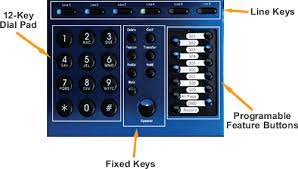
Line appearance keys
The first row of button usually has your line keys labeled line 1 – line x
A line key provides an extension user with one-button access to outside lines. The extension user just presses a line key to place or answer a call on the line. There is no need to dial codes to access or intercept outside calls. In addition, a line key provides a Busy Lamp Field (BLF) for the line to which it is assigned (see the table below).
Off – Idle or not installed
On (red) – In use or on Exclusive Hold at a co-worker’s extension
On (green) – In use at your extension
Wink On (red) – On System Hold at a co-worker’s extension
Wink On (green) – On System Hold at your extension
Double Wink On (green) – On Exclusive Hold or recalling your extension
Slow Flash (red) – Ringing into the system
Slow Flash (green) – Ringing or recalling directly to your extension
To place a call using a line key:
1. Lift the handset.
2. Press the line key.
3. Dial the outside number.
To answer an incoming call using a line key.
1. Listen for ringing and look for the flashing line key.
- Line keys that flash red are for you and your co-workers.
- Line keys that flash green are just for you (such as DILs and transfers).
2. Lift the handset.
3. Press the flashing line key.
- If you have Ringing Line Preference, lifting the handset answers the call.
- If you have Automatic Handsfree, while on a call you can press another line key to put your first call on Hold.
Auto-Attendant Answer
If your incomming calls ring to either an operator phone (usually extension 300) or a group of phones pressing this button will make the auto-attendant answer instead. Callers will hear your company greeting (Hi thank you for calling xyz company….) instantly. If your auto-attendant answers calls all of the time you will not have this button on your phone.
Operator Message
This button will flash when a message has been left in your general delivery mailbox. To check the message simply press the flashing operator message button. Although extension 300 is usually the operator extension the general delivery messages are NOT stored in mailbox 300. This is to give you the option of having a generic mailbox and a personal mailbox for the employee at extension 300. Pressing the operator message button will also allow you to record the greeting that is heard when an outside caller reaches the general delivery mailbox.
Operator Call
The operator call button give you a visual or audio indication that someone has pressed 0 (for the operator) from the auto-attendant. To answer the call you simply press the operator call button or the line button (this can also be programmed to answer when the handset is lifted).
Hotline buttons
Hotline gives a keyset user with a programmed Hotline key one-button calling and Transfer to another extension (the Hotline partner). Hotline helps co-workers that work closely together. The Hotline partners can call or Transfer calls to each other just by pressing a single key.
Hotline Busy Lamp Indications
Off – Idle or not installed
On – Busy or ringing1
Medium Flash – Partner extension is in DND for outside
calls (option 1).
Fast Flash – Partner extension is in DND for Intercom
calls (option 2) or All Calls (option 3).
Speed Dial Keys
The 10 keys below the display are your speed dial keys. These can be used to store frequently dialed telephone numbers. For a tutorial on programming the speed dial numbers click here.