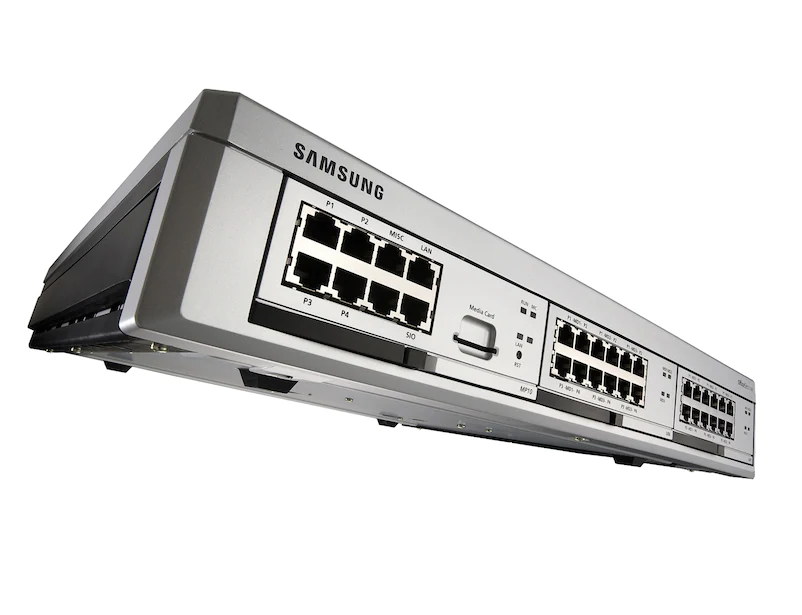
Samsung OfficeServ 7100 version 1.30

These are the files required to upgrade an OfficeServ 7100 phone system to software version 1.30i.
Please do not attempt unless you are a Samsung Certified Technician or are being assisted by one of our Certified Technical Support Staff (866-898-2303).
7100 Upgrade Procedure

Samsung DCSc – DCS Compact Phone System Manuals

These are the installation and programming manuals for the Samsung DCSc (DCS Compact) phone system.
Any changes should be made by or with the assistance of a certified Samsung technician.  Remote support can be purchased from TelephoneSystemsDirect.com. Please call 866-898-2303 option 3 for assistance and information.
DCSc Installation Manual
DCSc Program Manual
Samsung DCSc User Guides

Samsung OfficeServ Link version 2.2.0.6

officeservlink-v2206-20080805
Samsung OfficeServ Link is an application gateway that provides the interface between other software applications (both Samsung and third party) and the Samsung iDCS product line of telephone systems. It is a software application that links the telephone system to a Windows based computer that is dedicated to the sole use of OfficeServ applications. The [...]

Samsung OfficeServ Call Version 5.2.2.4

OfficeServ Call-v5224
The OfficeServ Call application is the Samsung iDCS solution for managing the converging business challenges of communications and information. Samsung OfficeServ Call seamlessly links two previously separate systems your telephone system and your personal computer, therefore providing the best of both worlds for your business. With Samsung OfficeServ Call, you receive a cost-effective and [...]

7100 software version 4.22b

This is version 4.22b of the Samsung OfficeServ 7100 telephone system.
Please contact a certified Samsung Technician or call us at 866-898-2303 for technical support (charges may apply).
422b 7100 software

Changing the Day and Night Greeting on Samsung Voicemails (SVMi)

These are instructions on changing the Day and Night greeting for a Samsung Officeserv phone system that uses a Samsung SVMi voicemail. These instructions will work on most OfficeServ 7100 phone systems, OfficeServ 7200 and7400 phone systems, OfficeServ/iDCS 100 and OfficeServ/iDCS 500 phone systems.
Use any Samsung iDCS 28D 28-button,  iDCS 18D 18-button phone, DS-5021D 21-button [...]

Samsung Telephone System Technical Support

Our experienced technicians can troubleshoot, repair and fine tune your Samsung telephone system programming. Most telephone system programming issues can be resolved by our technicians walking you through the programming steps over the telephone.  We also offer remote programming via a webmeeting.   If you are having a problem with the voice mail on your [...]

Samsung OfficeServ 7100 Software Version 4.22 Availability

Samsung Telecommunications America is pleased to announce the release of V4.22 system software for the OfficeServ 7100 phone system. Effective October 13, 2008 all software media cards for the OfficeServ 7100 phone system will ship with V4.22 software date code 08.08.20.
SIP Service Support is here…SIP Trunking and SIP stations
The new V4.22 software for the [...]

OfficeServ 7000 installation tool (for Samsung telephone systems)

OfficeServ 7100, 7200 and 7400 telephone system installation tool – IS-TOOL V1.22 (080820) RELEASE UPGRADE PROCEDURE
The IS-TOOL V1.22 software supports the new V4.22 OfficeServ 7000 software release. You will have to upgrade the IS-TOOL program with this new software before you attempt to upgrade your OfficeServ 7000 Switch with V4.22 Release.
Here [...]

OfficeServ 7100 telephone system version 4.22

Samsung Telecommunications America is pleased to announce the release of V4.22 system software for the Officeserv 7000 telephone systems. Effective October 13, 2008 all software media cards for the OfficeServ 7000 telephone systems will ship with V4.22 software date code 08.08.20.
For details on added features please visit this link
To download the new OfficeServ installation tool [...]

Changing the time and date – Samsung phone system

To change the time and date on a Samsung iDCS100, OfficeServ 7100, OfficeServ 100, OfficeServ 7200, OfficeServ 7400, iDCS500, 50si, DS616 and iDCS16 you must first log into admin programming:

Leave the handset down and press Transfer 200
Enter the pass code (1 2 3 4 by default)
Press 1 and then Speaker

Once you are in programming mode [...]

Samsung OfficeServ Link

Samsung OfficeServ Link
As one of the most important Samsung internet telephony products, Samsung OfficeServ Link is vital to establishing a connection between your employees’ computers and their OfficeServ phones. The Samsung OfficeServ family of applications is highly specialized; each application achieves a specific set of business objectives. Their primary purpose is to allow workers to utilize [...]

Samsung OfficeServ Communication Solutions

Samsung OfficeServ Communication Solutions
Encompassing a wide range of digital business products and services, Samsung OfficeServ communication solutions are considered industry standard by large and small companies alike. Whether your business has five or 5,000 employees, there is a Samsung OfficeServ communication solution that will fit your needs. There are two main divisions of Samsung OfficeServ: [...]

Samsung IDCS 100 Telephone System

Samsung IDCS 100 Telephone System
The Samsung iDCS 100 telephone system has become the industry standard for many smaller enterprises. While priced affordably, the iDCS 100 system offers higher-end features such as Voice-over Internet Protocol (VoIP) standard or optional in each of its configurations. By allowing your employees to use the Internet to make phone calls [...]

Samsung OfficeServ Call

Samsung OfficeServ Call
Samsung OfficeServ Call organizes your life by integrating call management into your computer. Business efficiency can be most effectively measured in the time it takes to do repetitive tasks. If, during your daily business routine, you need to call a lot of people at different times of the day, then call management should [...]

Why Buy your Samsung Phone System from us?

Advantages to buying your Samsung phone system from Telephonesystemsdirect.com
We have been selling, installing and servicing Samsung telephone systems since 1990. We have 18 years of experience and thousands of happy, satisfied customers. In 2005, 2006, 2007, 2008 (to date) we sold and installed more Samsung phone systems to end users, like yourself, than any other Samsung [...]

Samsung iDCS 500 VoIP Digital Telephone System

The Samsung iDCS 500 is a complete, Voice over IP, digital telephone system. One sample configuration is for 12 telephone lines and 32 digital station ports. The Samsung iDCS 500 can expand to 216 Lines and 384 digital telephones. The Samsung iDCS 500 can accommodate up to 9 T1 or PRI digital trunk cards. This [...]

An 8×24 Samsung OfficeServ 7200

The Samsung OfficeServ 7200 is a full featured, VoIP, digital wireless telephone system and Data Switch. One of many configuations can be for 8 digital telephone lines, 24 digital station ports and 8 Analog station ports. It can expand to 96 digital trunk lines, 160 digital wired telephones, 120 LAN Ports, 120 VoIP telephones and 24 digital wireless [...]

Setting up your Samsung voice mailbox

To get the most out of your voice mail it’s important that you properly set up your personal mailbox.
STEP 1: Record your mailbox greetings

Press the voice mail button on your phone and enter your password (0 0 0 0 by default). Press 5 from the mailbox menu.
Press 1 to assign your no answer greeting
Press [...]

Quick Reference Guide for the Samsung iDCS Phones

OUTSIDE CALLS – To place a call to an outside party.

Lift the handset.
Press an idle (no light) outside line button, line group button or dial a line access code (701 – 7xx) to receive dial tone.
Dial the telephone number.
Replace the handset or press the ANS/RLS key when the call is complete.

INTERNAL CALLS – To place [...]

Samsung message light stays on but there are no messages

Visit our online store to purchase Samsung telephones
The status indicator light is located at the top right of your Samsung iDCS18D and iDCS28D phone. This indicator flashes whenever you have a message waiting on your phone and turns solid red when your phone is in use. Occasionally that indicator light will remain flashing [...]

Samsung Literature

General Descriptions
OfficeServ 7100 General Description – List of Samsung OfficeServ 7100 parts and features.
OfficeServ 7200 General Description – List of Samsung OfficeServ 7200 parts and features.
OfficeServ 7400 General Description – List of Samsung OfficeServ 7400 parts and features.
User Guides
iDCS 18D User Guide
iDCS 28D User Guide
Samsung DS-5000 Series User Guide
Samsung 5121 IP Phone User Guide
Samsung 5007 [...]

Changing the Time and Date on a Samsung iDCS28D

To change the time and date on a Samsung telephone leave the handset in the cradle and press TRANSFER 200.
Enter the customer level programming password (1 2 3 4 by default)
Press 1 to enable programming and then press the SPEAKER button
Dial 505
Enter the day of the week (1=Monday, 2=Tuesday, Etc.)
Enter the Month
Enter the Day of [...]

Connecting a paging horn to a Samsung telephone system

To connect an external paging horn or system to a Samsung iDCS100 or iDCS16 telephone system you will need a to locate the system connection block, usually found next to the telephone system main cabinet. The paging connection on the Samsung OfficeServ 7100, 7200, 7400 and 500 telephone systems is usually located on the [...]

Recording the day greeting on an iDCS 28D

To change your day greeting on a Samsung iDCS 28D, iDCS 18D, DS-5021 and DS-5014 telephone:

Press the voicemail button
Press * # 0000
Enter the system password
Press 1 to edit system prompts
Enter 1001 for the Day prompt
Press 1 to listen to the current prompt.  If this is not the prompt you want to record press * *
If this is [...]

Recording the night greeting on an iDCS 28D

To change your night greeting on a Samsung OfficeServ 100, 500, 7100, 7200 and 7400 phone system:

Press the voicemail button
Press * # 0000
Enter the system password
Press 1 to edit system prompts
Enter 1002 for the Night prompt
Press 1 to listen to the current prompt.  If this is not the prompt you want to record press * [...]

Navigating when programming via a Samsung 28d phone

The first thing you should do when you enter programming mode on the Samsung OfficeServ 7000 phone system (iDCS18d and iDCS28d) is locate your cursor. Look on the top line, first character and you should see a small underscore, this is your cursor. To move the cursor around you use the left and right soft keys (the [...]


© 2010 Telephone Systems Direct All rights reserved. Powered by Wordpress. Designed by Woo Themes